

Porch CRM · Knock · Price Books
Run the whole business from one place
The door your rep knocks becomes a lead, the lead becomes a priced estimate, and the estimate becomes a paid job, without anything being re-typed. It all lives inside AtYourPorch.
One record
From the first knock to the final payment
Three tools, one chain. Each hands the job to the next with everything already filled in.
Knock
Door
A rep knocks and logs the outcome from their phone.
Knock
Appointment set
The only outcome that moves a door into your CRM.
Porch CRM
Lead
Appears with the details from the door, ready to hand to a closer.
Price Books
Estimate
Quantities in, priced estimate out, sent for signature.
Porch CRM
Paid job
Payments land on the job and update the balance.
Porch CRM
Every lead, job and payment in one record
Name every stage the way your trade says it. Underneath, each stage rolls up to the same six steps, so your counts and reports stay comparable however you label them.
New Lead
1Dana R.
No cooling upstairs
Site visit
1your name for “Appointment”
Marcus T.
Furnace tune-up · Tue 9:00
Estimate Sent
1Priya N.
3-ton AC replacement
Install booked
1your name for “Won”
Chris L.
Heat pump install
Install underway
1your name for “In Progress”
Ana G.
Duct sealing
Completed
1Lee W.
Thermostat upgrade
Pick a trade to see the same board in that trade's words. Stage names, jobs and people are made up.
Repeat customers
One customer, as many jobs as they bring you
A second job isn't a second record. It's a new tab on the same customer, and every job counts in your pipeline and numbers. Jobs you won on AtYourPorch and work you found yourself sit side by side, labeled so you always know which is which.
Maria S.
1 customer · 3 jobs · the same record, every time
- Contract
- $2,400
- Paid
- $1,200
- Balance
- $1,200
Comments & tasks
“Prefers a morning arrival window.”
Click a tab. Each job keeps its own status, money, photos and tasks.
What Porch CRM keeps for you
A pipeline in your words
Custom stages and your own colors, with a fixed backbone underneath so your numbers still add up.
Jobs on one record
Repeat work becomes a new job tab on the same customer. Old jobs stay editable while new ones run.
Money on the record
Contract amount, payments received and balance sit on the job, and update when a customer pays through AtYourPorch.
Photos and documents
Before, During and After albums and files for every job, instead of a camera roll nobody can search.
Comments and tasks, together
One card per lead for private notes and to-dos, so reps and managers see the same story.
Your whole team
Add teammates, assign leads and see who's closing what, with a leaderboard for the whole team.
Recurring customers
Turn any customer into an account with a service plan and a payment schedule, and watch your monthly recurring revenue.
Reports and call lists
Build reports from your own data and have them emailed on a schedule. Build a call or knock list from rules, or export a mailer list.
Bring your history
Switching from another CRM? Import customers, notes, activity and photos from a CSV or Excel export. Columns are matched for you.
Knock · canvassing
Canvassing that actually tracks
Draw a territory on the map and give it to one rep or several. Every door your team knocks is logged against it, and the outcomes your reps can pick are the ones in the key. Knock replaces the clipboard, the spreadsheet and the group text.
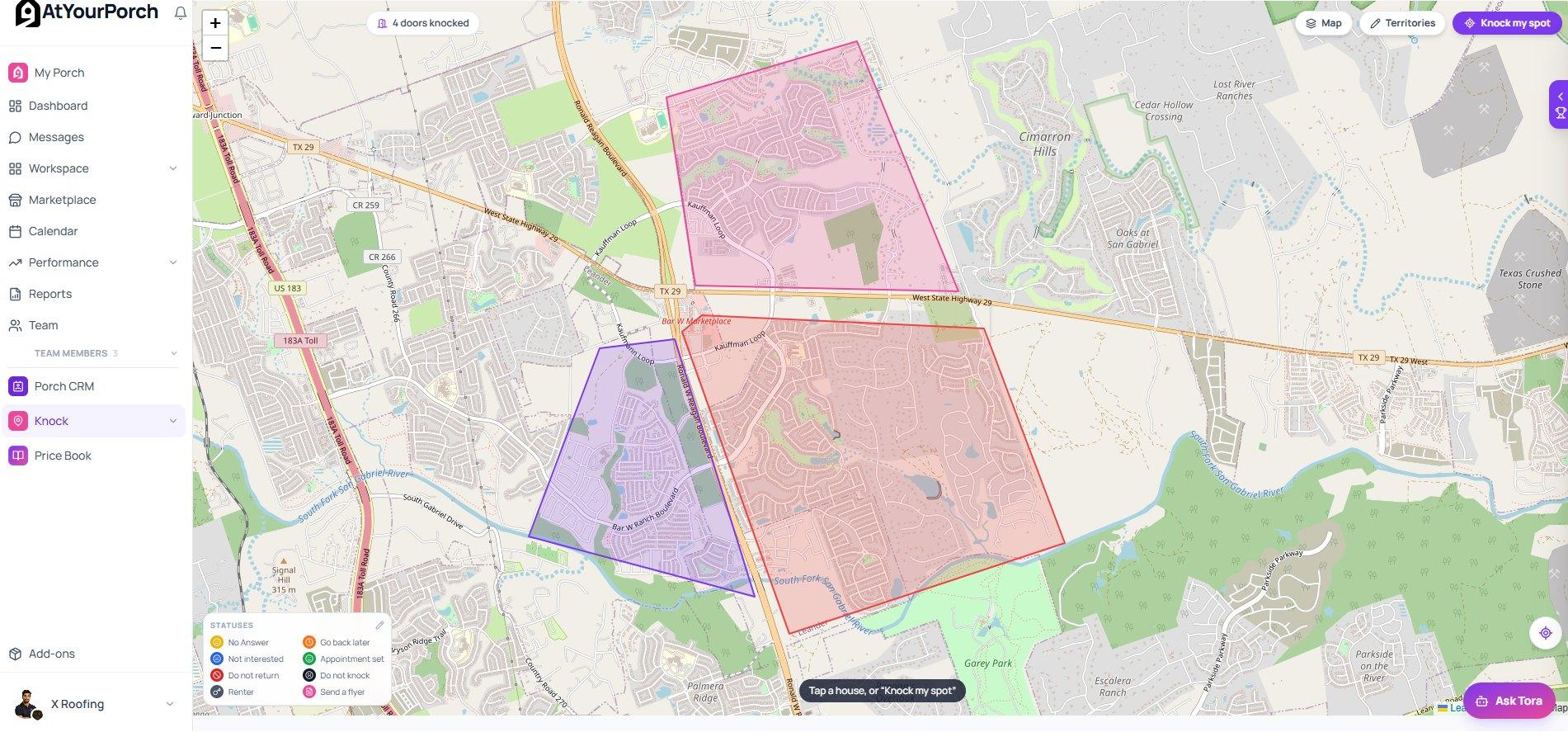
The Knock map in a demo account: three drawn territories, the Statuses key (owners can edit the outcomes), and Knock, Porch CRM and Price Book in the sidebar.
At the door
One tap to log it, and the right place for it to go
Your rep picks the outcome. Most doors stay in Knock. The ones that turn into appointments move on to your CRM.
Current door
412 Maple Lane
Territory A · 38 of 62 doors done
How did it go?
Tap an outcome to see where that door goes.
Try each outcome to see where the door ends up.
Built for the street, tied to the business
Satellite map and drawn zones
See your territories and every door knocked, with satellite view when you need to scout a street.
Several reps per territory
Give a zone to one rep or a crew, and each rep sees their own zones under My Territories.
Outcomes you control
Eight defaults to start. Rename them, add your own, set colors, and keep separate lists for residential and commercial.
Your lead form, at the door
The same custom fields you use for a new CRM lead appear when your rep sets an appointment.
Stats that show who's closing
Doors knocked, time out, appointments set and conversion rate for every rep, plus a team leaderboard.
GPS-verified logging
Doors are logged from the rep's location, so you know a door was actually walked.
| Rep | Doors | Appointments | Conversion | Hours out |
|---|---|---|---|---|
| 1Dana K. | 142 | 11 | 8% | 6.5 |
| 2Marcus T. | 118 | 9 | 8% | 5.8 |
| 3Jo R. | 77 | 6 | 8% | 4.2 |
| 4Alex P. | 96 | 4 | 4% | 5.1 |
Sample week, made-up reps. Conversion is appointments divided by doors.
Price Books · estimating
Quote faster, with your own numbers
Build your rate sheet once. For each job, enter the quantities and the estimate prices itself, with your costs, margin and the rep's commission worked out where the customer can't see them. Try it: pick a trade, change a quantity, and flip to the customer's copy.
HVAC system replacement
| Item | Type | Qty | Unit | Cost internal | Margin internal | Price | Line total |
|---|---|---|---|---|---|---|---|
| 3-ton condenser | Material | each | $1,800.00 | 35% | $2,769.23 | $2,769.23 | |
| Evaporator coil | Material | each | $650.00 | 35% | $1,000.00 | $1,000.00 | |
| Line set | Material | each | $220.00 | 40% | $366.67 | $366.67 | |
| Smart thermostat | Material | each | $180.00 | 45% | $327.27 | $327.27 | |
| Install labor | Labor | hour | $95.00 | 30% | $135.71 | $1,085.71 |
- Subtotal
- $5,548.88
- Tax (8.25% on materials)
- $368.21
- Total
- $5,917.10
Job cost & profit · private
- Your cost
- $3,610.00
- Gross profit
- $1,938.88 (35%)
- Rep commission (8%, example)
- −$443.91
- Net profit
- $1,494.97
Sample prices and costs. Price is cost ÷ (1 − margin), the same math as the product. Tax applies to materials; labor is set to 0%.
Quote to signed
From a priced estimate to a signature
The calculator fills your estimate form, and you send it to sign from the same place. You see when it was opened and when it was signed, and the signed copy stays on the customer's record.
Tables you shape
Add, rename and reorder columns. Each has a role, such as cost, price, percent or calculated, so the calculator knows what it means.
A real calculator
Per-unit prices live in the book, quantities are entered per job, and totals and tax update as you type.
Internal or customer-facing
Mark each column as internal or shown on the document. Cost and margin can drive the math and never print.
Markup or margin, your call
Price lines either way, with a live conversion between the two. Commission is set per rep, and the basis is yours.
Products and rate sheets
Keep a catalog of what you sell, and add those products to a rate sheet whenever a job calls for them.
Starter books for your trade
Start from a sample for roofing, HVAC, plumbing, electrical, painting, fencing or handyman work, then make it yours.
Estimate to signature
Estimate built from a Price Book
Oct 14 · 9:02:11 AM
Sent to the customer to sign
Oct 14 · 9:04:40 AM
Customer opened it
Oct 14 · 10:31:02 AM
Customer signed
Oct 14 · 10:32:07 AM
- Signed copy and the time-stamped trail are saved to the job.
Sample timeline, made-up times.
Questions
Answered
Is this only for roofers?
No. Porch CRM, Knock and Price Books are built for any home-service trade: HVAC, plumbing, electrical, roofing, painting, landscaping, fencing and general contracting. You name your own pipeline stages, door outcomes and price-book columns, so each tool speaks your trade's language.
What does it cost?
Porch CRM, Knock and Price Books come together as one add-on: $150 a month plus $25 a month per team member. You can add it or cancel it anytime, and everything else on AtYourPorch stays free.
Can I bring my existing customers over?
Yes. Import customers, notes, activity and photos from your current CRM's CSV or Excel export. Columns are matched for you, and you can review the mapping before anything is added.
Do the customers I add myself count toward my Trust Score?
No. Jobs and customers you bring in yourself stay yours and are kept separate from your platform stats. Only work that happens through AtYourPorch counts toward your Trust Score.
What happens to doors that don't turn into appointments?
They stay in Knock. Every door is logged and counts toward the rep's stats and your map, but only a door with an appointment set becomes a lead in Porch CRM, so your pipeline isn't buried in dead doors.
Do I have to add my reps before they can use Knock?
Yes. Anyone who appears in Knock or Porch CRM is first a member of your team, so every door and every lead is tied to a real person.
Will my customers see my costs and margins?
No. In a Price Book, every column is either internal or shown to the customer, and you choose which. Costs, margins and commission drive the math but stay off the customer's copy.
If I change a price later, do my old estimates change?
No. Each estimate keeps the figures it was created with. Edit your price book whenever prices move; estimates you already sent stay exactly as quoted.
What it costs
Porch CRM, Knock and Price Books come together: $150/mo plus $25/mo per team member.
Add it from your dashboard and cancel anytime. Everything else on AtYourPorch is free.
Run the whole business in one place
Join AtYourPorch free, then add Porch CRM, Knock and Price Books from your dashboard when you're ready.
Join Free